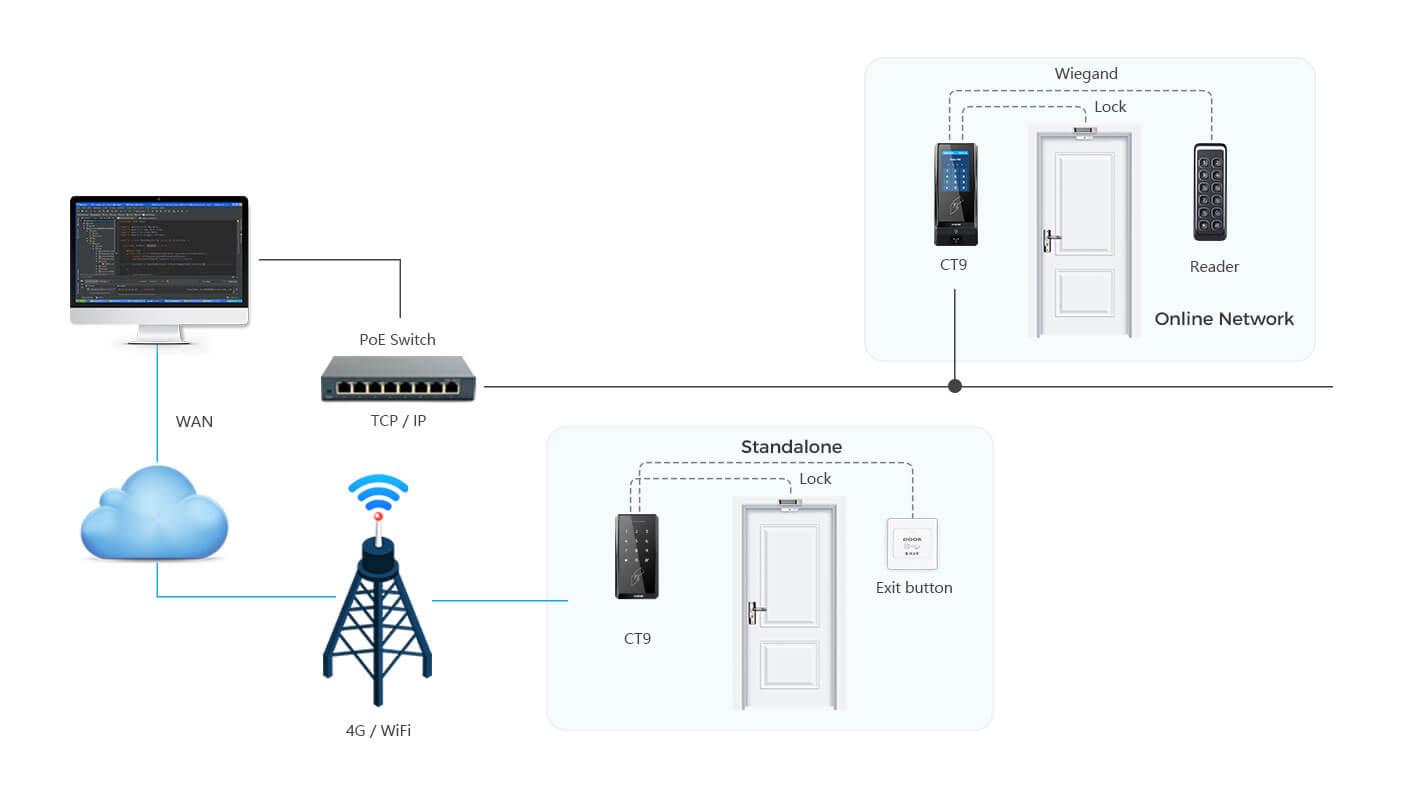
A wireless standalone unit is a cable‑saving decentralized access‑control hardware for modern access‑control systems. Different from wired 32‑bit, 64‑bit or 128‑bit network access controllers which require LAN cable wiring, this unit adopts Wi‑Fi or Bluetooth wireless communication, with on‑board flash memory for local storage of user permissions, time schedules and access event logs. It can run fully offline without connecting to PC or server. It supports multiple credential modes including RFID card, fingerprint, QR‑code and facial recognition, and can trigger magnetic locks, electric bolt locks or send dry‑contact signals to pedestrian turnstile gates. Sintronic wireless standalone units have been deployed for overseas access‑control projects including Nigeria and Saudi Arabia small‑enterprise and renovation reference projects.
Core Working Principle of Wireless Standalone Unit
Sintronic wireless standalone unit follows cable‑free access workflow: Wireless Configuration → Credential Reading → Local Decryption & Permission Check → Unlock / Reject Output → Local Log Recording (Sync Optional). Full‑cycle operation steps are described as follows.
1. Wireless parameter configuration via mobile / PC
System administrators complete device setup via mobile APP or local wireless‑connected PC. Import user information, assign door access rights, configure time‑zone schedules and alarm parameters. Configuration data is transmitted over Wi‑Fi or Bluetooth and saved locally into the unit’s flash memory.
Key advantage: No network cable routing required. Ideal for renovation projects where wall‑cable installation is difficult or expensive. After configuration is finished, the unit can work completely offline without continuous wireless connection.
2. Credential reading and data transmission
Users present valid credentials: RFID IC card, fingerprint, QR‑code or facial recognition to connected readers. Credential data is sent to wireless standalone unit via Wiegand or RS485 bus.
3. Local decryption and permission validation
The standalone unit decrypts incoming credential data locally. It matches credential ID against onboard stored user database, and verifies access authority including time‑zone schedule and special rules such as anti‑pass‑back. All authentication calculation happens on‑device; it does not depend on cloud or central server.
4. Execution of access instruction‑ Access granted: Controller activates relay output, sends trigger signal to release electric door lock or trigger turnstile gate opening. Local LED and buzzer give access‑allowed prompt.
‑ Access denied: No unlock signal will be generated; local prompt indicates invalid credential.
5. Event log recording & optional wireless sync
Every access activity including successful entries, denied attempts and alarm triggers is saved into local flash memory. When Wi‑Fi / Bluetooth connection is available, event logs can be synchronised wirelessly to mobile APP or management software for audit reporting. If wireless signal is lost, logs are cached locally and auto‑sync once wireless connection restores.
6. Alarm‑trigger processing
Door‑contact sensor monitors door physical state. In case of door‑overtime open or forced‑intrusion, the controller generates alarm events which can be transmitted wirelessly to administrator mobile terminal or trigger local alarm devices.

 Indonesia
 Malaysia
 Saudi Arabia
 United States
 South Africa
 Germany
 Russia
 Italy
Italy Portugal
 Vietnam
 Zimbabwe
 South Korea
 Ruben| Project Manager | Sintronictech is good