Operation of Elevator Cabinet Multi‑Door Controller in Integrated Building Security Solution
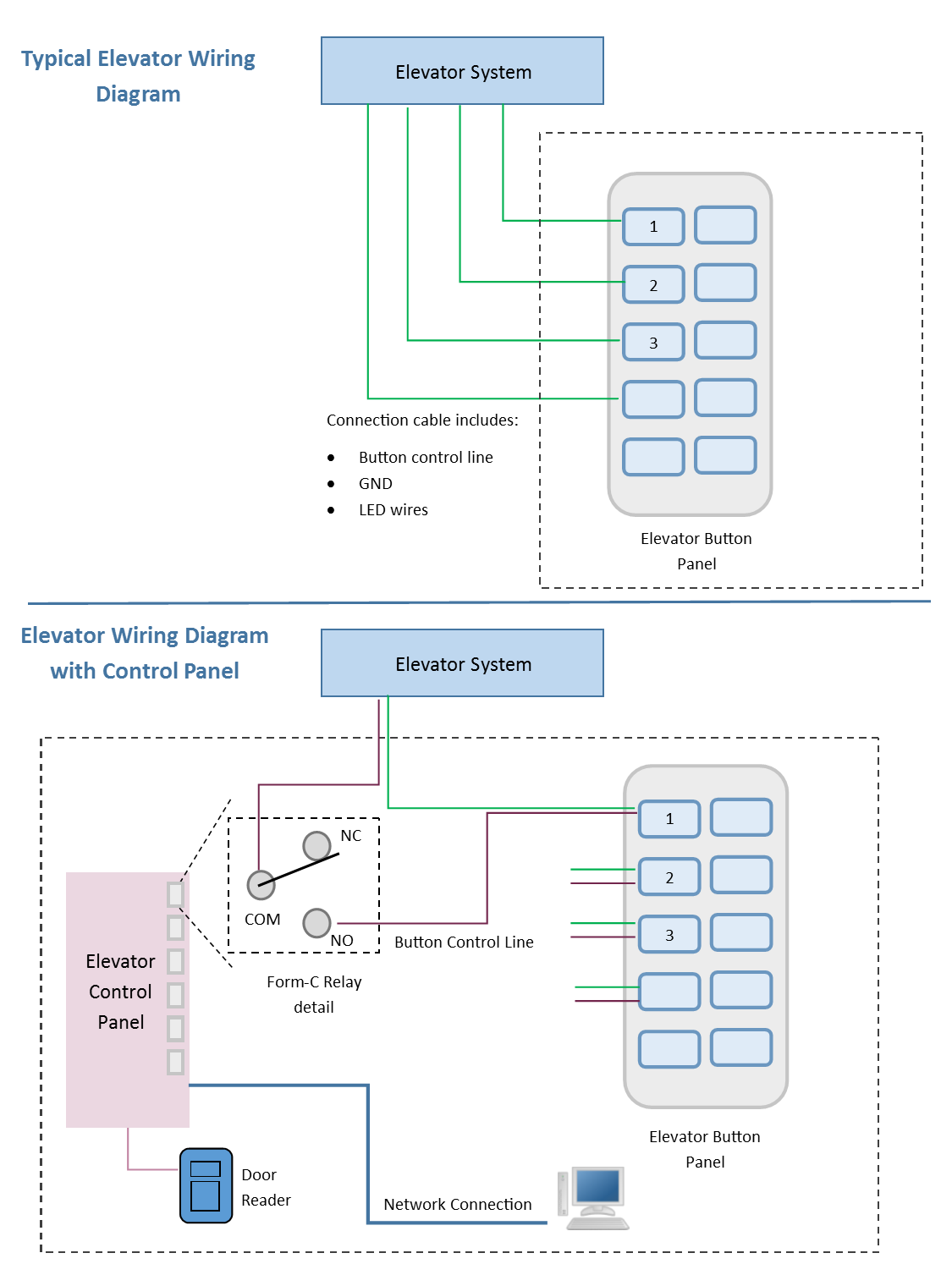
An elevator cabinet multi‑door controller (cabinet‑type elevator floor access controller) is a special industrial hardware unit for integrated building access‑control systems. Housed inside a protected metal cabinet, it integrates multi‑channel relay output modules for elevator floor permission management and multi‑door access signal switching. It connects with credential readers, elevator button panels, access‑control management software, and can cooperate with door access controllers or pedestrian turnstile gates. Administrators assign floor‑specific access rights to different users, so authorized personnel can only select pre‑approved elevator floors. Sintronic elevator cabinet multi‑door controllers have been deployed for overseas building‑security projects including Nigeria and Saudi Arabia multi‑floor commercial building reference projects.
Core Working Principle of Elevator Cabinet Multi‑Door Controller
Sintronic elevator cabinet multi‑door controller follows multi‑floor access workflow: Credential Verification → Permission Matching → Relay‑Channel Activation → Elevator‑Floor Unlock → Event Log Recording. Full‑cycle operation steps are described as follows.
1. Pre‑configuration via ACS‑SW management software
System administrators configure parameters through Sintronic ACS‑‑SW access‑control software via TCP/IP network: import user information, assign independent elevator‑floor permissions for each user group, set time‑zone schedules, holiday access rules, and alarm trigger parameters. All permission datasets are downloaded and saved locally to controller flash memory. The controller supports fully‑functional offline operation if PC‑server or LAN network connection is lost.
2. Credential verification inside elevator car
A passenger presents valid credentials (RFID IC card, fingerprint, QR‑code or facial recognition) to the reader installed inside elevator cabin. The reader transmits credential ID to elevator cabinet multi‑door controller via Wiegand or RS485 bus.
3. User‑floor permission matching validation
The controller looks‑up credential ID against local stored user database. It verifies whether this user has valid permission for target floors, and also checks time‑schedule access constraints.
‑ If validation fails: All floor‑relay channels stay deactivated. Passengers cannot trigger any elevator‑floor‑button function.
‑ If validation passes: Corresponding relay channels for authorized floors are activated.
4. Relay output to enable elevator floor buttons
Activated relays short‑circuit corresponding elevator‑car button signal lines. Now passengers can press and select those permitted floor buttons inside the elevator. Floors without user authorization remain disabled, even if passengers press those buttons.
5. Event log recording & network synchronization
Every credential‑verification action, elevator‑floor access record and abnormal‑alarm event is saved into local flash memory. When LAN network is available, event logs upload synchronously to ACS‑SW software for audit reporting. When network goes offline, logs are cached locally and auto‑upload once network connection restores.
6. Alarm‑trigger processing
When abnormal events occur, such as illegal credential attempts or equipment tampering, the controller generates alarm signals which can be uploaded to management PC or trigger external alarm devices. After elevator completes floor delivery, relays reset automatically and return to standby state for next user.

 Indonesia
 Malaysia
 Saudi Arabia
 United States
 South Africa
 Germany
 Russia
 Italy
Italy Portugal
 Vietnam
 Zimbabwe
 South Korea
 Ruben| Project Manager | Sintronictech is good