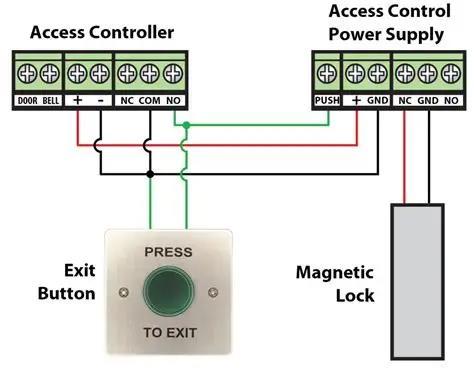
An exit button, also widely known as REX (Request‑to‑Exit) button, is an essential momentary input peripheral for complete access‑control systems. Installed on the indoor side of security doors, it sends short trigger signal to access controller so occupants can exit freely without presenting RFID card, fingerprint or facial credential. It features momentary self‑reset contact output with NO / NC / COM terminal options, and cooperates with electromagnetic lock, dropbolt lock and 32‑bit /64‑bit /128‑bit access controllers. Sintronic exit buttons have been deployed for overseas access‑control projects including Nigeria and Saudi Arabia multi‑floor commercial‑building reference projects.
Core Working Principle of Exit Button in Access Control System
Sintronic exit button follows simple request‑to‑exit workflow: Button Press → Momentary Contact Signal → Access‑Controller Input Capture → Unlock Relay Trigger → Timed Door Release → Auto‑Relock & Event Logging. Full‑cycle operation steps are described as follows.
1. Standby idle status
At normal standby condition, exit button stays at default contact status (NO remains open, NC remains closed). Access‑controller monitors button‑input port continuously, while door stays locked by electromagnetic lock or dropbolt lock. No signal is generated without manual pressing.
2. Manual button press to trigger signal
Indoor occupant presses the exit button. Momentary switch acts and changes contact state for short duration. The NO‑COM contact closes (or NC‑COM disconnects), sending brief dry‑contact trigger signal to access‑controller input terminal. Once user releases pressure, switch automatically rebounds back to standby status immediately.
3. Access‑controller captures REX trigger signal
Access‑controller hardware detects the change from exit‑button input port. Controller recognizes this as valid request‑to‑exit command, no further credential verification is required for indoor egress.
4. Timed door‑unlock execution
Controller activates lock‑relay output for pre‑configured unlock‑hold delay time (normally 1‑6 seconds):
‑ For electromagnetic mag‑lock: Cut power supply temporarily to release magnetic holding force.
‑ For dropbolt lock: Send trigger signal to retract bolt tongue.
Door becomes free to push open for indoor personnel exit.
5. Automatic re‑lock after timeout
When preset unlock‑delay timer expires, access‑controller restores lock output state. Electric lock returns to locked condition. Exit‑button circuit is back to idle standby for next trigger.
6. Event log recording & optional network synchronisation
Each exit‑button trigger action will be saved into access‑controller local memory as event record. When LAN network is available, logs synchronise to ACS‑SW access‑control management software for security audit. If network drops offline, logs are cached locally and auto‑upload once network connection restores.
Important safety note: Exit button implements free indoor egress, complying with most building fire‑safety codes, ensuring personnel can evacuate without credentials during emergency situations.

 Indonesia
 Malaysia
 Saudi Arabia
 United States
 South Africa
 Germany
 Russia
 Italy
Italy Portugal
 Vietnam
 Zimbabwe
 South Korea
 Ruben| Project Manager | Sintronictech is good