An RFID card (Radio‑Frequency Identification card, also known as proximity card, IC card or RFID key fob) is the most widely‑adopted passive contact‑less credential within a complete access‑control system. Without built‑in battery, it harvests electromagnetic energy from an RFID reader to transmit its unique identifier wirelessly. The reader forwards credential data via Wiegand or RS485 to access controllers, which then make access‑grant decisions and trigger electric locks or pedestrian turnstile gates. Sintronic RFID cards and matching readers have been deployed for overseas access‑control projects including Nigeria and Saudi Arabia multi‑floor commercial‑building reference projects.
Core Working Principle of RFID Card in Access Control System
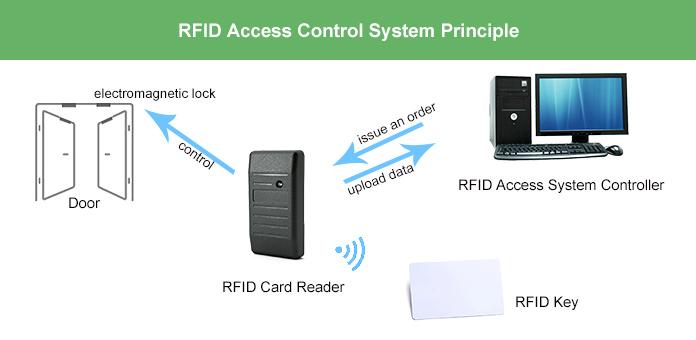
Sintronic RFID card follows passive contact‑less access workflow: Reader RF‑Field Emission → Passive Card Activation → UID Data Transmission → Controller Permission Matching → Unlock / Deny Execution → Event Log Recording. Full‑cycle operation steps are described as follows.
1. Pre‑enrolment & card registration phase
System administrators use Sintronic ACS‑SW access‑control management software to register each RFID card’s unique UID into access‑controller local database. Assign corresponding door access rights, time‑zone schedules and group permissions. Configuration data is saved in controller flash‑memory for offline operation.
2. RFID reader emits electromagnetic radio‑frequency field
The wall‑mounted RFID reader keeps continuously emitting stable radio‑frequency electromagnetic field within short reading range (2‑10 cm). It stays standby and waits for RFID credential to enter its sensing zone.
3. Passive RFID card gets activated wirelessly
When user brings RFID card or key‑fob close to reader, the card’s internal copper antenna captures electromagnetic energy from reader field. Since it is passive hardware, no battery inside RFID card is required. Captured energy powers up the on‑board micro‑chip.
4. Unique UID identifier transmits back to RFID reader
Powered chip sends its pre‑stored unique identification (UID) number back to reader via radio‑frequency signal. Reader decodes the signal and converts card ID into standard Wiegand or RS485 output format.
5. Data transfers to access controller for permission validation
Reader transmits formatted credential ID to connected access‑controller mainboard. Controller looks‑up this UID against locally‑stored authorised‑user database, and validates access permission together with time‑schedule rules.
‑ Access granted: Controller triggers relay output signal to activate electromagnetic lock / dropbolt lock or send opening trigger to pedestrian turnstile gate. Reader gives green‑LED and beep success prompt.
‑ Access denied: No unlock signal will be generated. Reader triggers red‑LED warning prompt for invalid or unregistered card.
6. Event log recording & optional network synchronisation
Every access‑related activity (valid entry, denied swiping attempts) is saved into access‑controller local memory. When LAN network is available, event logs synchronise to ACS‑SW management software for attendance and security audit reporting. If network drops offline, logs are cached locally and auto‑upload once connection restores.

 Indonesia
 Malaysia
 Saudi Arabia
 United States
 South Africa
 Germany
 Russia
 Italy
Italy Portugal
 Vietnam
 Zimbabwe
 South Korea
 Ruben| Project Manager | Sintronictech is good