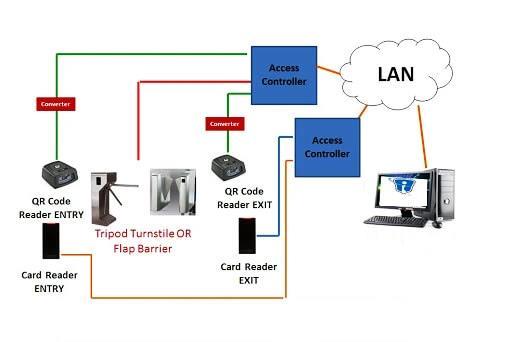
A QR bar code reader is a contact‑free front‑end identification peripheral for modern access‑control systems. It is capable of decoding both 1‑dimensional barcodes and 2‑dimensional QR codes, supporting both static fixed codes and time‑limited dynamic QR credentials. After scanning and decoding valid code information, it outputs standard Wiegand or RS485 signals to communicate with access controllers, elevator cabinet multi‑door controllers and various pedestrian turnstile gates. It serves as ideal hardware for temporary visitor authorization, event‑site entry and regular staff access. Sintronic QR‑bar‑code readers have been deployed for overseas access‑control projects including Nigeria and Saudi Arabia office and campus reference projects.
Core Working Principle of QR Bar Code Reader
Sintronic QR bar code reader follows contactless barcode‑based access workflow: Credential Generation → QR / Barcode Image Capture → Local Decoding → Data Transmission to Controller → Permission Validation → Access‑Grant Signal Output → Event‑Log Recording. Full‑cycle operation steps are described as follows.
1. Pre‑configuration & credential generation phase
System administrators use Sintronic ACS‑SW access‑control management software to generate access credentials. Two major code types are supported:
‑ Static QR / barcode: Fixed‑ID credential for long‑term staff use.
‑ Dynamic time‑limited QR code: Time‑expirable one‑shot credential for visitors, contractors or event participants. Generated codes can be sent to end‑users via email or mobile messaging. Reader parameters are configured and saved into local reader memory.
2. QR or barcode image capture
End‑users present valid credentials: smartphone screen displaying QR‑bar‑code image, or printed paper barcode pass, towards the optical scanning window of QR‑bar‑code reader. The optical module captures high‑resolution image of barcode/QR code.
3. On‑device image decoding and data parsing
Built‑in decoding chip processes captured image, corrects screen reflection, light interference and distortion, extracts unique credential ID information from 1D‑barcode or 2D‑QR‑code data block. If code is damaged or unrecognizable, reader triggers audio‑visual invalid‑code prompt and terminates workflow.
4. Decoded‑data transmission to downstream controller
After successful decoding, QR‑bar‑code reader transmits parsed unique ID via Wiegand or RS485 bus to connected access‑control controller.
Note: Reader itself mainly completes image‑decoding task; actual permission comparison is finished on access‑controller side against local user permission database. Some advanced models support partial offline code‑list storage inside reader hardware.
5. Permission validation and access‑execution instruction‑ Access‑passed: Access‑controller matches received ID against local database and confirms valid permission & time‑schedule rules. Controller sends unlock trigger signal to activate magnetic lock, elevator floor permission or open pedestrian turnstile gate. QR‑bar‑code reader gives green‑LED and beep success prompt.
‑ Access‑denied: Credential ID is invalid, expired or out of allowed time window. No unlock signal will be generated, reader outputs red‑LED and warning buzzer alert.
6. Event‑log recording & optional network synchronisation
All scanning activities (valid entry, invalid scanning attempts, expired‑code events) are recorded on access‑controller side. When TCP/IP network is available, event logs synchronise to ACS‑SW management software for visitor audit and attendance reporting. When network is offline, logs are cached locally and auto‑sync once network connection restores.

 Indonesia
 Malaysia
 Saudi Arabia
 United States
 South Africa
 Germany
 Russia
 Italy
Italy Portugal
 Vietnam
 Zimbabwe
 South Korea
 Ruben| Project Manager | Sintronictech is good