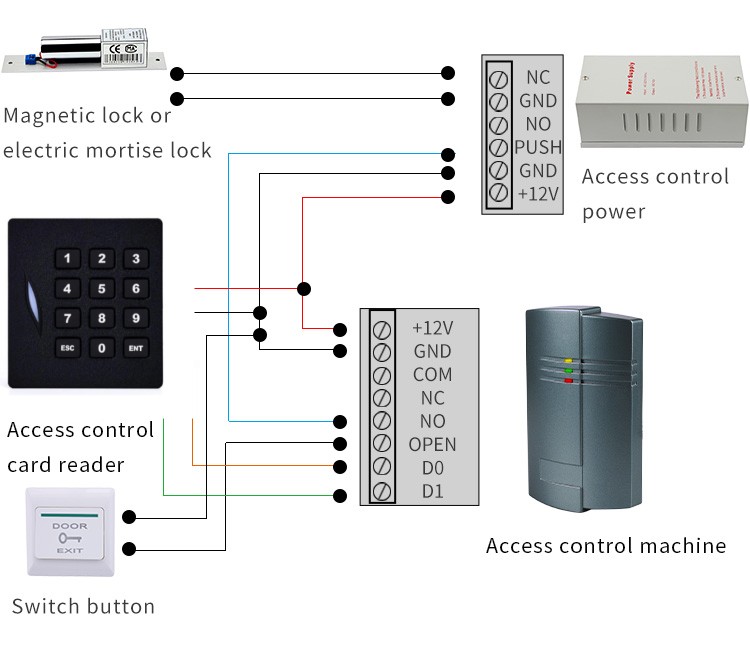
A keypad reader (also known as PIN‑pad reader) is a cost‑effective front‑end credential peripheral for modern access‑control systems. Equipped with physical or capacitive backlit numeric keys, many Sintronic keypad readers integrate built‑in RFID proximity card reading module. It supports multiple authentication modes: PIN‑code only, card‑only, or combined card‑plus‑PIN multi‑factor verification. After valid credential input, it sends standard Wiegand or RS485 output signals to communicate with access controllers, elevator cabinet multi‑door controllers and pedestrian turnstile gates. It is widely adopted for sites requiring flexible password‑based access. Sintronic keypad readers have been deployed for overseas access‑control projects including Nigeria and Saudi Arabia office and warehouse reference projects.
Core Working Principle of Keypad Reader
Sintronic keypad reader supports three main authentication modes: PIN‑code only, RFID card‑only, card‑plus‑PIN multi‑factor authentication. Full‑cycle access workflow: Credential Input → Local Pre‑Processing → Data Transmission to Controller → Permission Validation → Access Grant / Deny → Event‑Log Recording. Full‑cycle operation steps are described as follows.
1. Pre‑configuration phase
System administrators set working modes via access‑control hardware dip‑switches or Sintronic ACS‑SW management software. Select authentication rule: PIN‑only, card‑only, or card+PIN two‑factor mode. Configure output protocol (Wiegand or RS485), key‑beep enable/disable, wrong‑attempt lock‑out threshold. Parameters are saved into keypad reader’s local memory.
2. Credential input by end‑user
Three available input scenarios:
‑ PIN‑code only: User directly inputs numeric PIN sequence on keypad, presses # key for confirmation.
‑ Card‑only: User taps RFID card / fob against the built‑in proximity sensing zone.
‑ Multi‑factor (card + PIN): User first presents RFID card, then enters corresponding valid PIN code and confirms with # key.
3. Input data pre‑processing on keypad reader
The on‑board chip captures key‑press sequence or card serial number. It filters wrong key‑press, filters duplicate trigger. If consecutive wrong‑input count exceeds configured threshold, keypad triggers temporary lock‑out to block brute‑force password guessing attacks.
4. Credential‑data transmission to downstream access controller
After valid input sequence is captured, keypad reader packages credential information and transmits data via Wiegand or RS485 bus to the connected access‑control controller.
Note: For network‑type system architecture, keypad mainly completes input collection and data formatting. Real permission comparison and user‑database matching are finished on access‑controller side. Some standalone keypad variants store PIN database locally and make unlock decision on‑device.
5. Permission validation and access‑execution instruction‑ Access‑passed: Access‑controller matches received credential against local user database and verifies time‑zone access rules. Controller sends unlock trigger signal to activate magnetic lock, elevator floor permission or open pedestrian turnstile gate. Keypad reader outputs green‑LED and success beep prompt.
‑ Access‑denied: PIN or card credential is invalid, expired, or fails multi‑factor matching. No unlock signal is generated; keypad triggers red‑LED and warning beep alert.
6. Event‑log recording & optional network synchronisation
All access‑related activities (valid entry, wrong PIN attempts, lock‑out events) are recorded on access‑controller side. When TCP/IP network is available, event logs synchronise to ACS‑SW management software for security audit reporting. When network goes offline, logs are cached locally and auto‑sync once network connection restores.

 Indonesia
 Malaysia
 Saudi Arabia
 United States
 South Africa
 Germany
 Russia
 Italy
Italy Portugal
 Vietnam
 Zimbabwe
 South Korea
 Ruben| Project Manager | Sintronictech is good