Understanding How Touch‑Screen Stand‑Alone Units Function in Access Control Systems
A touch‑screen stand‑alone unit is an all‑in‑one access‑control terminal designed for hybrid offline‑and‑online door entry management within a complete access‑control system. Different from network‑dependent 32‑bit /64‑bit /128‑bit access controllers which mainly rely on PC‑side software for parameter setup, this unit integrates a capacitive touch‑screen display, local flash‑memory database, relay output and multi‑protocol communication ports. System technicians can finish user enrolment, time‑schedule setup and system configuration directly via the on‑device touch menu without connecting to management software. It also supports network connection to Sintronic ACS‑‑‑SW software for centralized management. Compatible with RFID, PIN password and external biometric readers (fingerprint, facial recognition), it can drive magnetic locks, electric bolt locks or send trigger signals to pedestrian turnstile gates. Sintronic touch‑screen stand‑alone units have been deployed for overseas access‑control projects including Nigeria and Saudi Arabia small‑office and retail‑site reference projects.
Core Working Principle of Touch‑Screen Stand‑Alone Unit
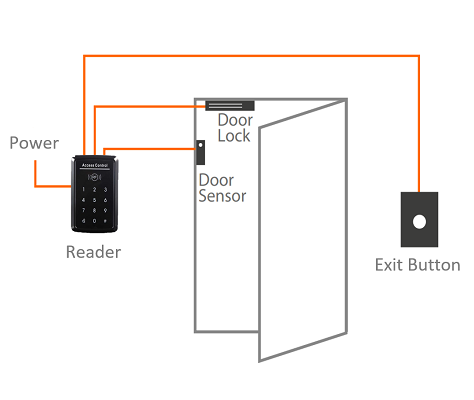
Sintronic touch‑screen stand‑alone unit supports two major working modes: fully‑stand‑alone offline mode and network‑connected centralized‑management mode. Full‑cycle operation workflow: On‑Device Touch‑Screen Configuration → Credential Input → Local Permission Validation → Unlock / Reject Signal Output → Event‑Log Local Storage (Optional Network Sync). Full‑cycle operation steps are described as follows.
1. System configuration (two available approaches)‑ Offline stand‑alone configuration: Administrators log into the device‑side admin menu via touch‑screen UI. Complete user adding/deleting, access‑time‑schedule setup, alarm‑parameter configuration directly on‑terminal. All permission data is saved into local flash‑memory, no PC or network required.
‑ Network‑connected configuration: Under TCP/IP network connection, system administrators use Sintronic ACS‑‑‑SW software to remotely edit user permissions and system parameters; configurations are downloaded and stored locally in the unit.
2. Credential reading and data input
Users present valid credentials: RFID IC card, PIN password entered via touch‑screen keypad, or biometric information captured by external fingerprint / facial‑recognition reader. Credential data is transmitted to the stand‑alone unit.
3. Local‑side permission validation
The unit performs credential matching locally against its onboard stored user database. It validates user identity together with corresponding time‑zone, holiday and anti‑pass‑back access rules. All verification logic runs on‑device, and does not depend on network or management‑server availability.
4. Execution of access instruction‑ Access granted: The unit activates relay output, sends trigger signal to release electric door lock or trigger turnstile‑gate opening. Touch‑screen and buzzer give access‑granted prompt feedback.
‑ Access denied: No unlock signal will be generated; touch‑screen and audio prompt inform access‑denied status.
5. Event‑log recording & optional network synchronisation
Every access activity including successful entry, failed attempts and alarm triggers is saved as encrypted event‑log in local storage.
‑ In offline mode: Logs stay cached locally; administrators can export logs via USB flash drive through touch‑screen menu.
‑ In network‑connected mode: Event logs synchronise automatically to ACS‑SW management software for audit and attendance reporting. When network drops offline, logs are cached locally and auto‑sync once network connection restores.
6. Alarm‑trigger processing
Door‑contact sensor monitors door physical state. In case of door‑overtime‑open or forced‑intrusion, the unit generates alarm events which can be shown on touch‑screen, uploaded to management PC or trigger local alarm devices.

 Indonesia
 Malaysia
 Saudi Arabia
 United States
 South Africa
 Germany
 Russia
 Italy
Italy Portugal
 Vietnam
 Zimbabwe
 South Korea
 Ruben| Project Manager | Sintronictech is good