Working Mechanism of Fingerprint Reader for Biometric Door & Turnstile Access Management
A fingerprint reader is a widely‑adopted biometric front‑end verification terminal for modern access‑control systems. Equipped with optical or capacitive fingerprint sensor and embedded biometric algorithm chip, it captures fingertip minutiae feature points and converts them into irreversible encrypted digital templates instead of saving raw fingerprint photographs. It outputs standard Wiegand or RS485 authorization signals to connect with 32‑bit /64‑bit /128‑bit access controllers, elevator cabinet multi‑door controllers and full‑series pedestrian turnstile gates. Multiple credential modes are supported: fingerprint only, fingerprint+RFID card, fingerprint+PIN code for multi‑factor authentication. Sintronic fingerprint readers have been deployed for overseas building‑security projects including Nigeria and Saudi Arabia office and factory reference projects.
Core Working Principle of Fingerprint Reader
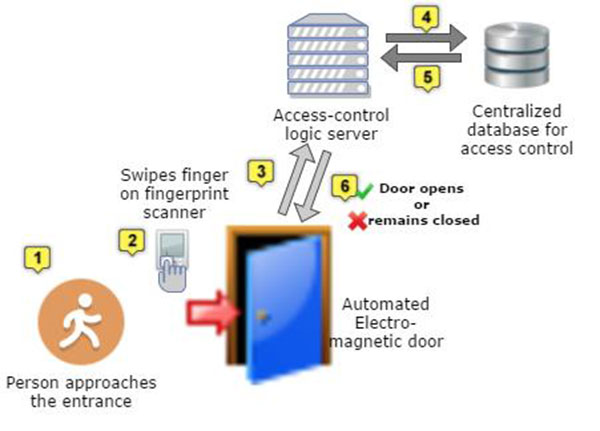
Sintronic fingerprint reader follows biometric access workflow: User Enrolment → Fingerprint Image Capture → Feature Extraction & Encrypted Template Generation → Local Template Matching → Signal Output → Event Log Recording. Full‑cycle operation steps are described as follows.
1. Pre‑enrolment phase
System administrators complete user enrolment via ACS‑SW access‑control management software or local terminal operation. The sensor captures multiple samples of one fingertip. The on‑board algorithm extracts unique minutiae points (ridge endings, bifurcations, coordinate data) and converts data into irreversible encrypted mathematical templates. Raw fingerprint images will be discarded and will not be saved. Encrypted templates are saved in local on‑board flash memory. The terminal supports offline verification without continuous PC‑server connection.
2. Fingerprint image capture
When a user places a fingertip onto the sensor surface, optical or capacitive sensor captures fingertip ridge‑valley pattern. Built‑in image pre‑processing module optimizes image quality, filtering noise caused by dirty, dry or slightly damaged fingertips.
3. Biometric feature extraction and template generation
The biometric chip extracts unique minutiae feature points from the processed fingerprint image and generates a real‑time comparison template. Anti‑spoofing logic filters fake fingerprint moulds and imitated samples to block fraudulent access attempts. If anti‑spoof check fails, verification terminates immediately and access gets rejected.
4. Local template matching comparison
The newly‑generated real‑time template is compared against pre‑stored encrypted user templates inside local memory. The algorithm calculates similarity matching score. When the score meets pre‑configured security threshold, identity verification is judged as passed.
5. Authorization signal output to downstream hardware‑ Verification passed: The reader outputs Wiegand / RS485 valid‑access signal. The connected access controller, elevator controller or turnstile gate receives trigger signal and unlocks door / activates elevator floor permission / opens pedestrian barrier. LED and audio prompt indicate access granted.
‑ Verification failed: No trigger signal is sent; local prompt informs access denial.
6. Event log recording & optional network sync
Every verification activity including successful entry, failed attempts and anti‑spoof‑detection alarms is saved as encrypted event log in local storage. When TCP/IP network is available, logs synchronize to ACS‑SW management software for audit and attendance reporting. If network drops offline, logs are cached locally and auto‑sync once network connection restores.

 Indonesia
 Malaysia
 Saudi Arabia
 United States
 South Africa
 Germany
 Russia
 Italy
Italy Portugal
 Vietnam
 Zimbabwe
 South Korea
 Ruben| Project Manager | Sintronictech is good